

ERP vs. CRM: What's the Difference and Which One Does Your Business Need?
As businesses grow at a rapid pace, system decisions also become strategic. In this regard, ERP vs. CRM are often discussed as competing platforms. Well, they're not. They solve different problems at different stages of growth, and choosing the wrong one (or choosing at the wrong time) can slow momentum instead of accelerating it.
Our team worked with multiple scaling and enterprise-level organizations, and we understood that most companies don't struggle because they lack software. The real problem hides in the systems that don't match their operational maturity.
This unique guide breaks down ERP vs. CRM clearly and practically, not just what they do, but when they make sense, what mistakes to avoid, and how to think about ERP vs. CRM implementation strategically. Ready to get your head wrapped around? Let's get started!

- ERP vs. CRM: Executive Snapshot
- ERP vs. CRM in One Clear Comparison
- The $2 Million Spreadsheet Problem
- What Is a CRM System?
- CRM: The Silent Revenue Leak Most Leaders Miss
- What Is an ERP System?
- Real ERP Example: Internal Company Portal by Devabit
- ERP vs. CRM: The Real Difference
- When You Should NOT Implement ERP or CRM
- Which Should You Implement First?
- Implementation Reality: Why Projects Succeed or Fail
- The Most Common Mistake We See
- Can ERP and CRM Work Together?
- Cloud vs. On-Premise Considerations
- Do You Eventually Need Both?
- Common FAQs about ERP vs. CRM
- ERP vs CRM: Final Perspective
ERP vs. CRM : Executive Snapshot
- CRM helps you generate and manage revenue.
- ERP helps you manage operations and control costs.
- Chaotic sales process? → Start with CRM.
- Finance, inventory, or procurement lack visibility? → You likely need ERP.
- Scaling both revenue and operations? → Plan for ERP + CRM integration.
The real question isn't ERP vs. CRM. It's this: Where is your current growth constraint, revenue generation or operational execution?
ERP vs. CRM in One Clear Comparison
| Category | ERP | CRM |
| Primary Focus | Internal operations | Customer relationships |
| Core Goal | Efficiency & cost control | Revenue growth |
| Main Users | Finance, HR, Ops, Supply Chain | Sales, Marketing, Support |
| Data Managed | Inventory, accounting, payroll, procurement | Leads, deals, contacts, pipeline |
| Typical Trigger | Scaling complexity | Scaling sales |
| ROI Driver | Process automation | Sales acceleration |
Shortly: if CRM is your growth engine, ERP is your operational backbone.
The $2 Million Spreadsheet Problem
Let's make this real. A mid-sized distributor was growing 30% year over year. Revenue looked strong. Sales were performing. But here is what we saw behind the scenes:
- Inventory mismatches were constant.
- Finance closed books three weeks late.
- Procurement relied on outdated spreadsheets.
- Sales promised delivery dates that operations couldn't meet.
They didn't have a revenue problem. They had a visibility problem.
Within 12 months of ERP implementation:
- Reporting cycles dropped from three weeks to three days.
- Inventory variance decreased significantly.
- Operational margins improved.
After all, it's clear that growth hides inefficiencies until it doesn't.
What Is a CRM System?
A Customer Relationship Management (CRM) system helps you manage every interaction with prospects and customers, from first touch to renewal. In practice, it does something more important. It makes revenue predictable.
What CRM Actually Solves
You likely need a CRM if:
- Sales reps track deals in spreadsheets.
- Leads fall through the cracks.
- Revenue forecasting is unreliable.
- Marketing and sales operate in silos.
- Follow-ups depend on memory.
A CRM centralizes:
- Lead tracking.
- Pipeline management.
- Sales forecasting.
- Customer communication history.
- Campaign performance.
CRM Business Impact
- Shorter sales cycles.
- Higher win rates.
- Improved forecast accuracy.
- Better customer retention.
CRM is typically the first structured system growing companies adopt because revenue chaos becomes visible faster than operational chaos.
CRM: The Silent Revenue Leak Most Leaders Miss
In companies without CRM:
- 20 - 30% of inbound leads often go untouched.
- Follow-ups are inconsistent.
- Sales velocity is unclear.
- Marketing ROI can't be accurately measured.
One SaaS company we observed generated over 1,200 inbound leads per month. After implementing structured CRM workflows, they discovered nearly 28% of leads had never been contacted. No new marketing budget was required. They simply needed structure. CRM doesn't just organize sales. It exposes revenue leakage.
What Is an ERP System?
An Enterprise Resource Planning (ERP) system connects internal operations into one unified platform. While CRM focuses outward, on customers, ERP focuses inward, on processes. It typically integrates:
- Financial management.
- Accounting.
- Inventory.
- Procurement.
- Supply chain.
- HR.
- Manufacturing operations.
In simple terms, ERP gives leadership a single source of truth for how the business actually runs.
Signs You Need ERP
You may need ERP if:
- Financial reporting takes weeks.
- Inventory doesn't match real stock.
- Procurement is manual and error-prone.
- Departments use disconnected tools.
- You lack real-time operational visibility.
ERP Business Impact
- Reduced operational costs.
- Improved forecasting accuracy.
- Stronger compliance posture.
- Better cross-department coordination.
- Scalable infrastructure for growth.
Real ERP Example: Internal Company Portal by Devabit
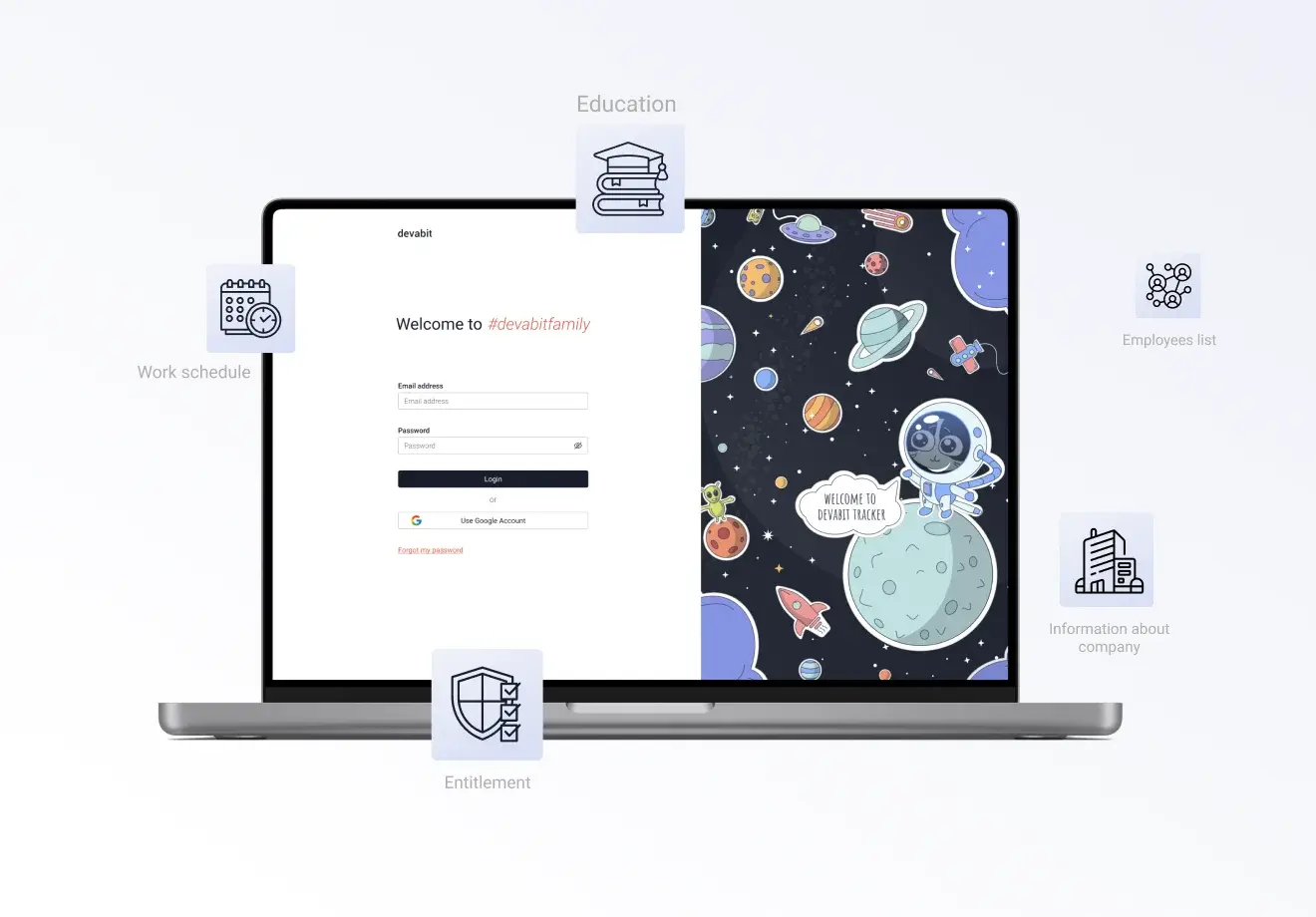
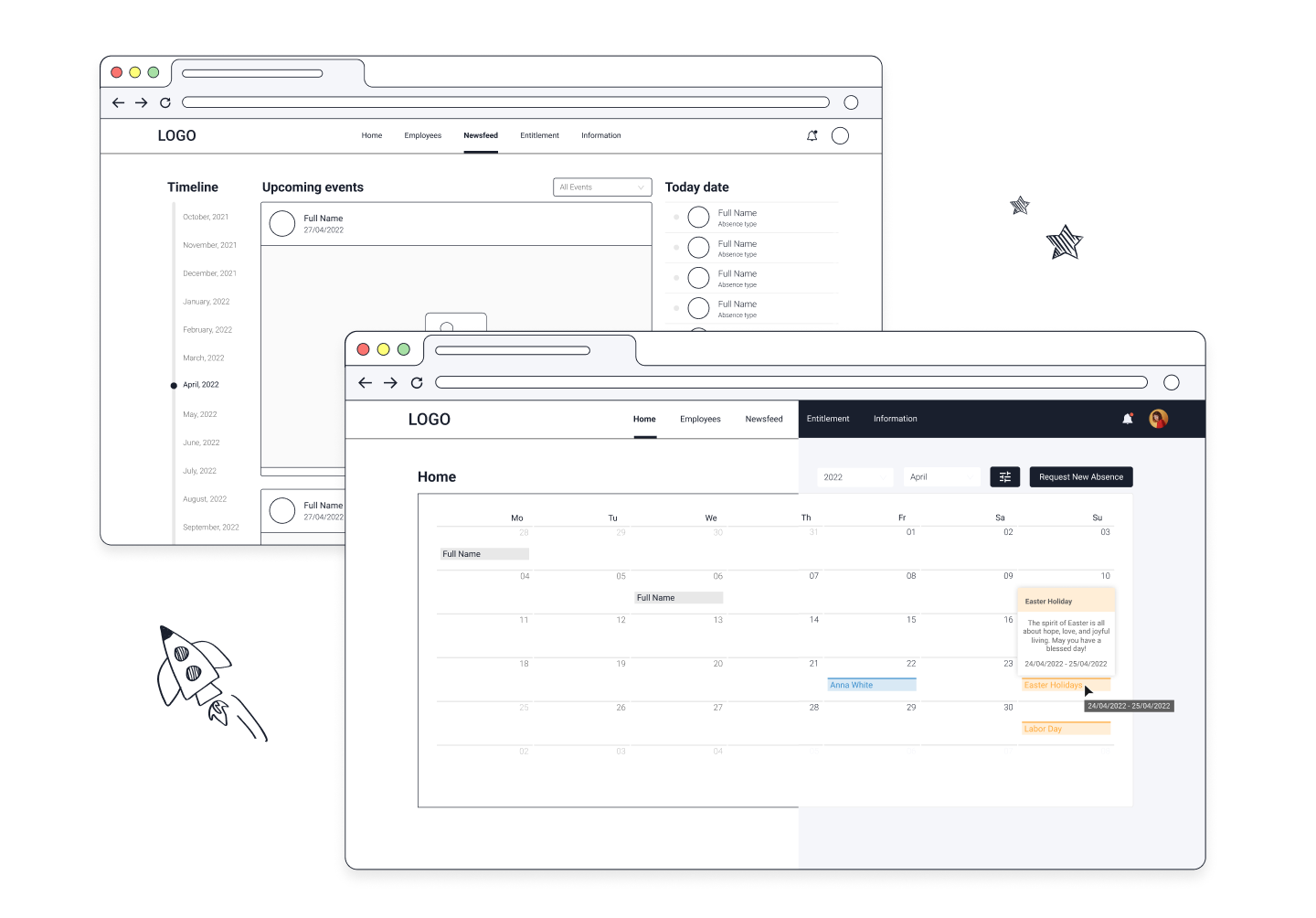
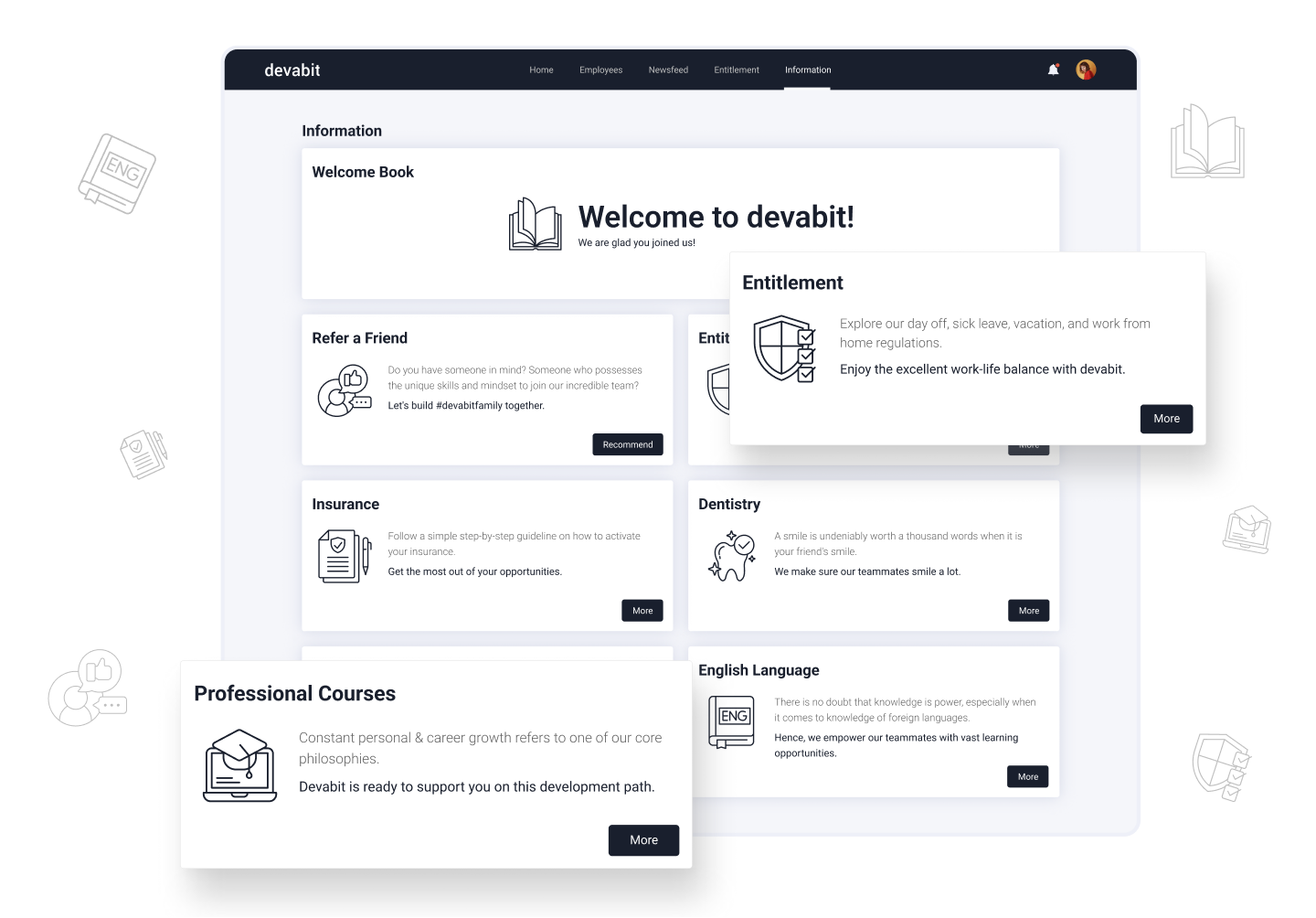
One concrete example of this strategic alignment between systems and business needs is the internal company portal devabit built for an information technology organization. This wasn't just a web project, it was an ERP-style internal system designed to improve communication, efficiency, and transparency across the organization.
What the Company Needed
The client needed a single digital platform where employees could access key information, from schedules and entitlements to important company updates. Rather than relying on disconnected tools (email, spreadsheets, intranet links), they wanted a unified portal that could:
- Centralize employee resources.
- Provide self-service functionality.
- Improve internal transparency.
- Support onboarding and knowledge sharing.
This aligns with one of the core strengths of ERP systems: bringing fragmented business processes under one roof.
How Devabit Helped
Our team conducted thorough research, including surveys and interviews with employees and stakeholders, to ensure the solution fit real daily needs. The result was a custom portal that included:
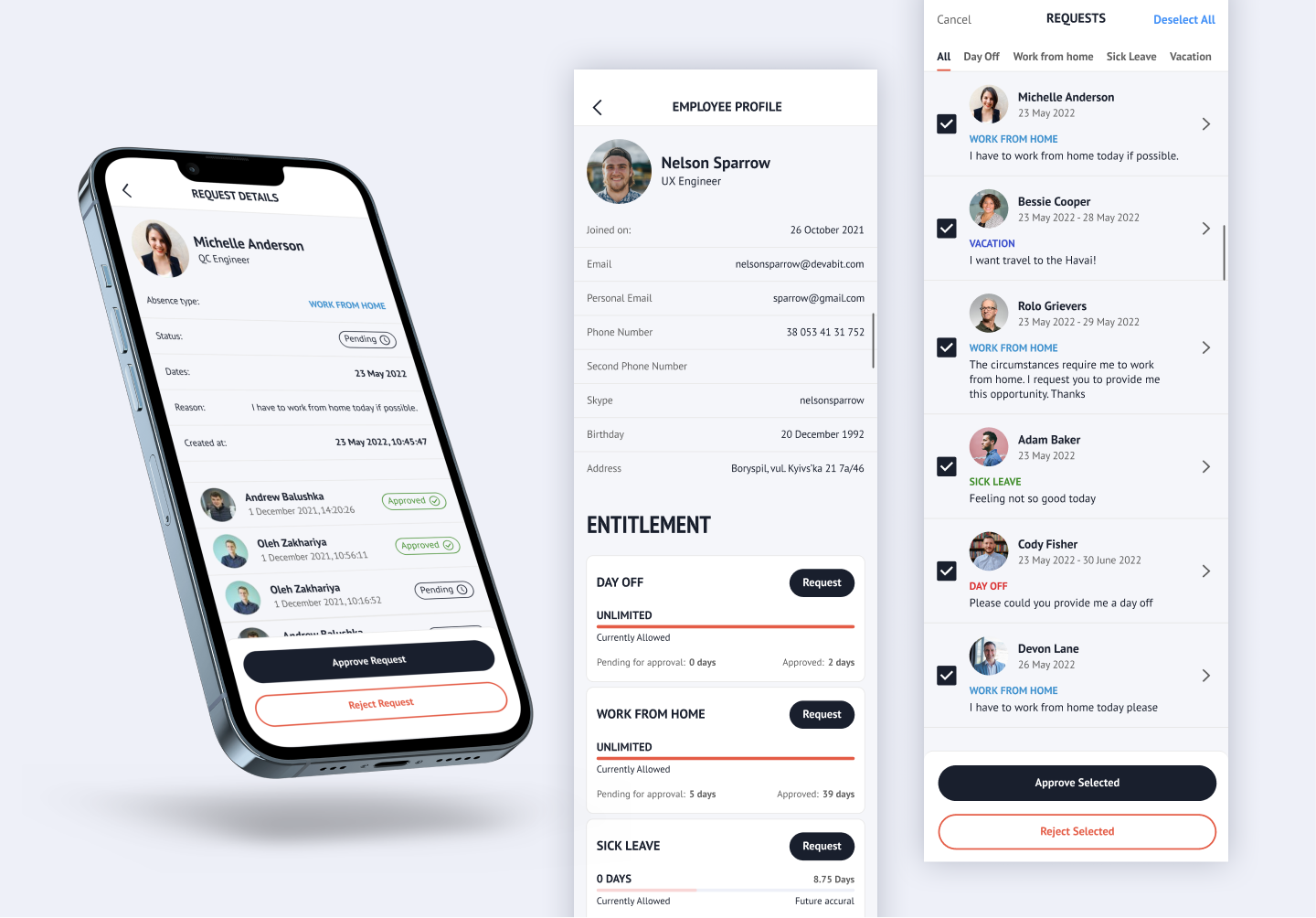
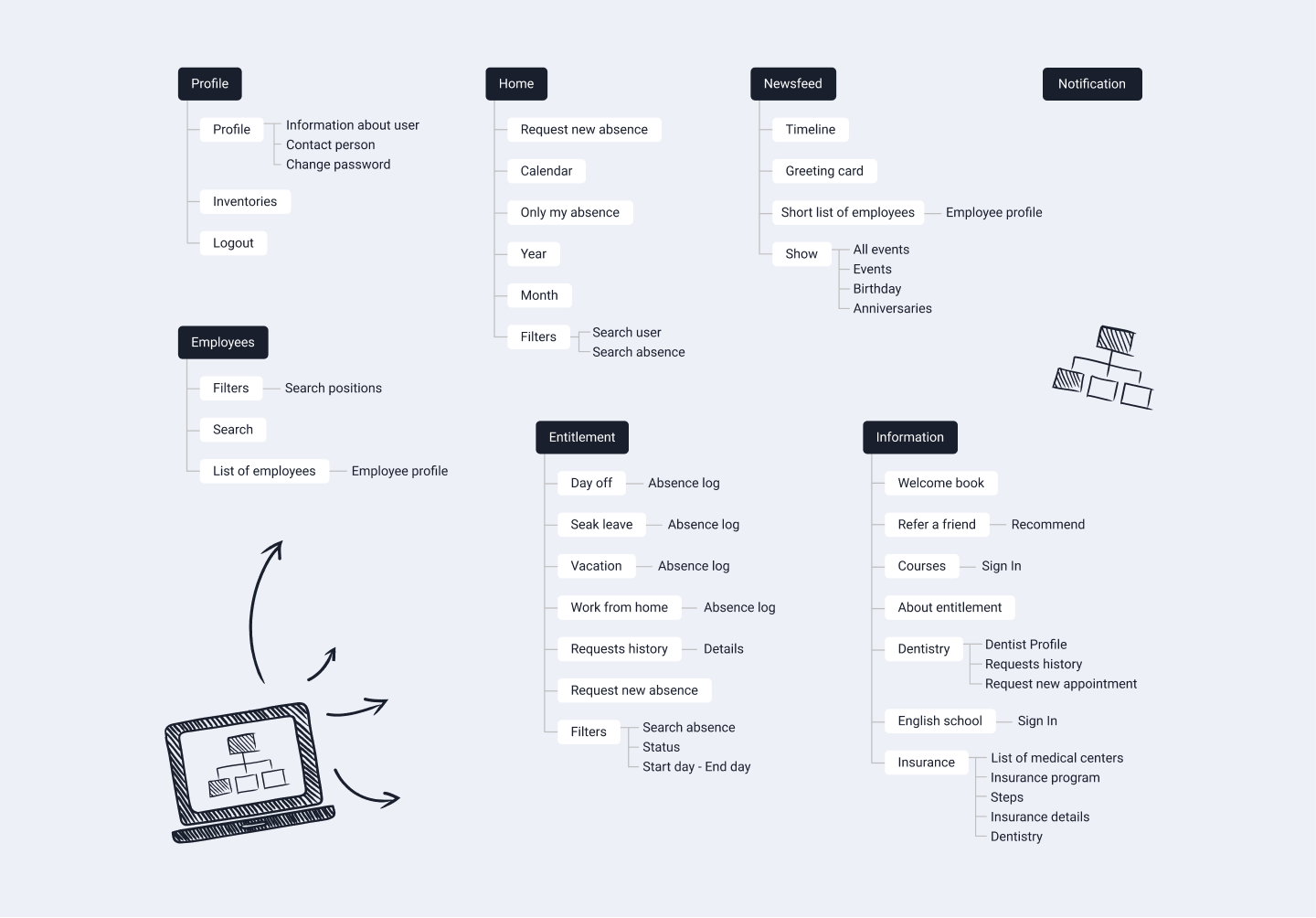
- Work schedules and team presence indicators.
- Employee lists with contact and profile information.
- Self-service features for leave and entitlements.
- A synchronized knowledge base for company information.
- Mobile-friendly access for remote and hybrid teams.
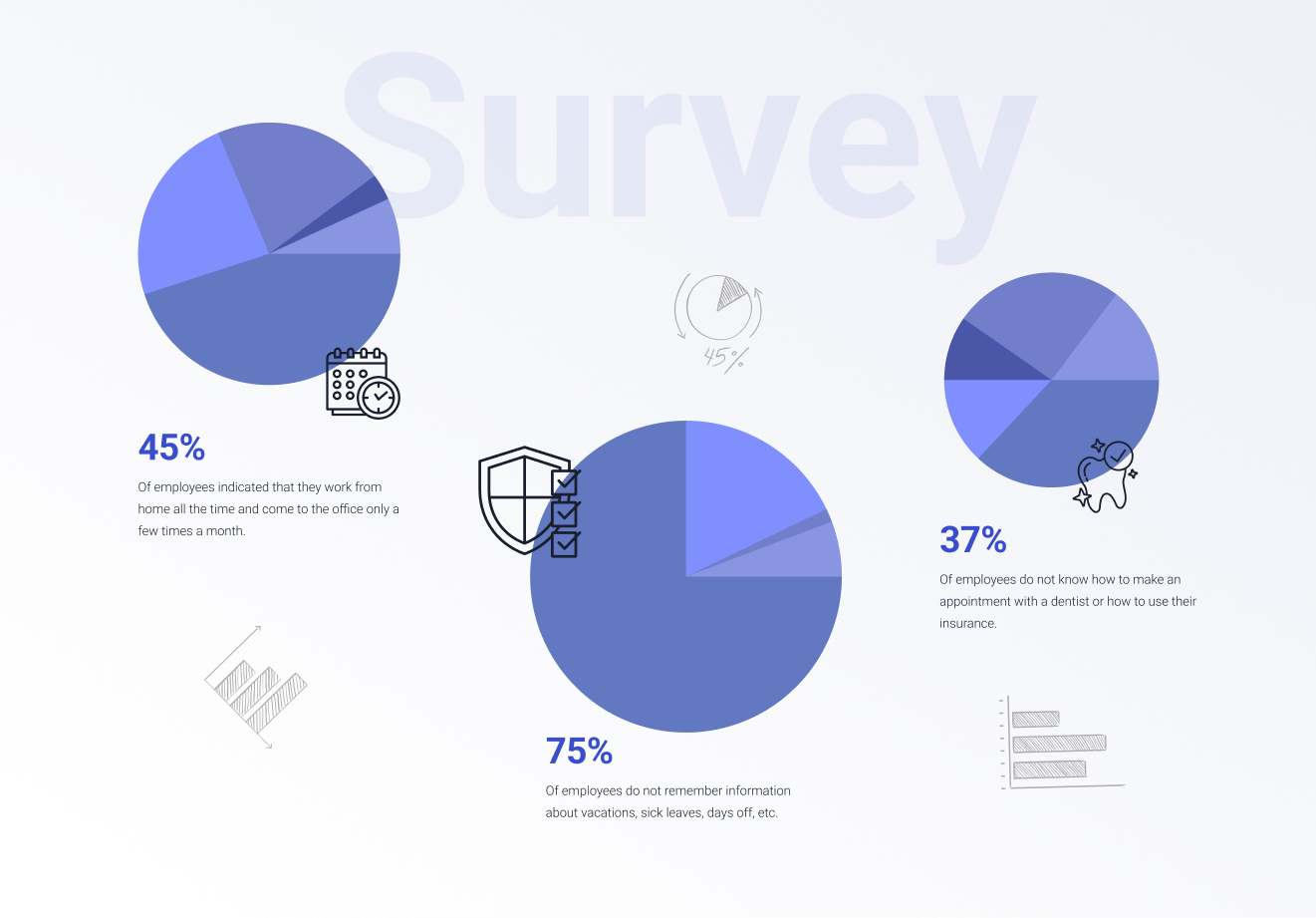
This wasn't a generic product. It was tailored around how people work and how information flows in a growing business, which is exactly the kind of strategic alignment an ERP-style solution is meant to achieve.
Why It Matters for ERP Strategy
This project highlights a key lesson: ERP-type solutions aren't just about managing finance or inventory, they can also unify internal processes and remove friction that hinders growth. Rather than migrating to a full enterprise suite right away, this internal portal gave the organization a controlled, high-value way to:
- Improve operational visibility.
- Reduce dependency on scattered tools.
- Standardize internal workflows.
- Increase employee productivity.
ERP vs. CRM: The Real Difference
Most businesses don't permanently choose one option. They decide which to implement first.
| If Your Biggest Problem Is… | You Likely Need |
| Missed sales opportunities | CRM |
| No sales visibility | CRM |
| Manual invoicing errors | ERP |
| Departmental silos | ERP |
| Rapid revenue growth without control | CRM first, ERP soon after |
| Scaling across regions | ERP + CRM integration |
When You Should NOT Implement ERP or CRM
Here's something most vendors won't say. Sometimes, you don't need either. If your processes are undefined, undocumented, or constantly changing, enterprise software will amplify chaos, not fix it. Software should digitize clarity, not compensate for its absence. Before implementing ERP or CRM, ask:
- Are our workflows standardized?
- Is leadership aligned on reporting structure?
- Do we have clean, structured data?
- Is change management planned?
Which Should You Implement First?
Scenario 1: Fast-Growing Startup
Revenue is growing. Sales hiring accelerates.
Priority: CRM. Revenue structure must come before operational sophistication.
Scenario 2: Manufacturing or Distribution Company
Inventory inaccuracies impact margin. Reporting delays affect decisions.
Priority: ERP. Operational visibility directly affects profitability.
Scenario 3: Mid-Market Scaling Company
Revenue is rising. Operations feel strained. Finance struggles to keep up.
Priority: Integrated ERP + CRM strategy. Growth without operational control creates long-term risk.
Implementation Reality: Why Projects Succeed or Fail
Choosing software is easy. Implementation is where companies win or lose. CRM projects often deliver measurable impact within 3 - 4 months when adoption is enforced and workflows are standardized. ERP projects are transformation initiatives. In mid-market manufacturing environments, deployments frequently span 9 - 14 months due to data normalization, financial configuration, and cross-functional alignment. ERP is all about operational redesign. And redesign requires executive sponsorship, disciplined data management, and change leadership.
The Most Common Mistake We See
Companies implement CRM too late and ERP too early. Startups delay CRM because spreadsheets "still work." Mid-market firms rush into ERP because leadership wants enterprise infrastructure. Both decisions create friction. The right timing aligns with business maturity, not ambition alone. Sophistication without necessity increases overhead. Structure aligned with growth creates leverage.

Can ERP and CRM Work Together?
Yes, and at scale, they should. When integrated:
- Sales sees customer payment history.
- Finance sees real-time revenue projections.
- Inventory informs sales commitments.
- Leadership gains unified reporting.
Cloud vs. On-Premise Considerations
Most modern ERP and CRM deployments are cloud-based due to:
- Faster implementation.
- Lower upfront infrastructure cost.
- Easier scalability.
- Remote accessibility.
On-premise solutions still make sense in certain compliance-heavy or highly customized environments. For most growing businesses, cloud-first strategies reduce complexity and accelerate ROI.

Do You Eventually Need Both?
For most scaling organizations, yes. Revenue growth without operational visibility eventually erodes margin. Operational control without revenue acceleration limits scale. Together, they create durable growth.
Quick Self-Assessment
Ask yourself:
- Do we have real-time sales pipeline visibility?
- Can we produce accurate financial reports on demand?
- Do departments rely on shared data?
- Is growth increasing internal strain?
- Are decisions based on consistent metrics?
Your answers reveal your priority.
Common FAQs about ERP vs. CRM
Is ERP better than CRM?
No. It's essential to understand that they serve different purposes. ERP manages internal operations, while CRM manages customer relationships and sales processes. As a result, most growing businesses eventually utilize both.
Can a CRM replace ERP?
No, CRM systems are not designed for financial management, inventory control, or procurement workflows.
Should startups use ERP?
Typically no. Startups usually begin with CRM and accounting software. ERP can be a great option in case operational complexity increases.
Can ERP and CRM be integrated?
Yes. Integration enables the sharing of data across sales, finance, and operations.

ERP vs CRM: Final Perspective
To be or not to be, to choose ERP ot CRM... Well, the thing is, ERP vs. CRM are not competing systems. They are complementary control layers. ERP ensures your organization operates efficiently, compliantly, and profitably at scale. CRM ensures your revenue engine is structured, measurable, and repeatable. If you're evaluating ERP, CRM, or an integrated architecture, don't start with demos. Start with a paint points analysis:
- Where is visibility missing?
- Where is complexity rising?
- Where is growth constrained?
Answer that clearly, and the system choice becomes obvious. At devabit, we help organizations align technology with growth stage, so software becomes leverage, not liability. If you're evaluating ERP, CRM, or integration strategy, let's talk before implementation begins.
Recent Publications
Don't miss out! Click here to stay in touch.
Discover More

Relevant Articles View all categories
View all categories CONNECT WITH US WE’RE READY
TO TALK OPPORTUNITIES
THANK YOU! WE RECEIVED YOUR MESSAGE.
Sorry
something went wrong